
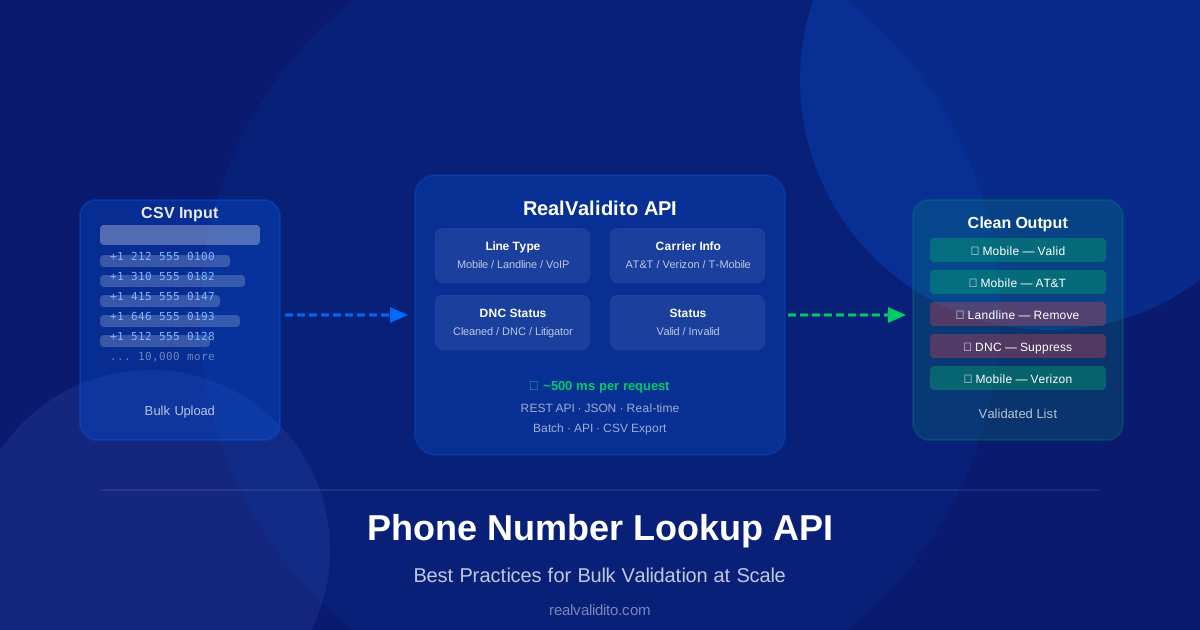
If you’re processing thousands of phone numbers for an SMS campaign, CRM cleanup, or lead generation effort, a phone number lookup API is the fastest and most reliable way to validate them at scale. But using the API effectively requires more than just sending requests — you need the right architecture, error handling, and data hygiene strategy.
In this guide, we’ll walk through the best practices for bulk phone number validation using a REST API, covering everything from request batching to result interpretation and list management.
What is a Phone Number Lookup API?
A phone number lookup API is a web service that accepts a phone number as input and returns current data about that number — including line type (mobile, landline, VoIP), carrier name, and Valid/Invalid status. A good lookup API uses frequently updated carrier data (RealValidito Phone Lookup data is updated daily), so ported numbers show their current carrier.
RealValidito’s Phone Lookup API returns all of this in a single call, with response times typically within 500 ms — making it suitable for both real-time validation at the point of entry and bulk processing of large lists.
Best Practice 1: Normalize Numbers Before Sending
Before sending numbers to the API, normalize them to the format the RealValidito API expects: exactly 10 digits — area code + number, with no +1, spaces or dashes (for example 2125551234).
Common issues to clean before sending:
- Remove spaces, dashes, dots, and parentheses
- Remove a leading +1 or 1 (the API expects 10 digits)
- Remove leading zeros
- Filter out obviously invalid numbers (less than 10 digits, all same digit)
Sending malformed numbers wastes API credits and slows down your processing pipeline. A simple normalization step before your API calls can reduce invalid requests on typical marketing lists.
Best Practice 2: Use Batch Processing for Large Lists
For lists of more than a few hundred numbers, avoid sending one request at a time. Instead, use one of these approaches:
CSV Bulk Upload
RealValidito’s bulk validation tool accepts CSV files directly. Upload your list, and the system processes all numbers in parallel, returning a validated CSV with line type, carrier and Valid/Invalid status for each row (and the DNC status too when you use Phone + DNC Lookup). This is the fastest option for one-off list cleanups — no coding required.
Batched API Requests
For programmatic bulk validation, send numbers in batches of up to 1,000 per request instead of one request per number, and run a few batches in parallel if needed. This can reduce processing time for a 10,000-number list from hours to minutes.
Retries and Error Handling
The API answers with HTTP 200 and a JSON status; HTTP 500, 503 or 524 means the server could not answer. Build in exponential backoff for those responses — wait 1 second, then 2, then 4, before retrying. You can send up to 1,000 numbers per API request — see the API documentation.
Best Practice 3: Understand the Response Fields
A phone number lookup API returns multiple data points. Here’s what each field means and how to use it:
| Field | Values | Action |
|---|---|---|
| Line Type | Mobile, Landline, VoIP, Toll-Free | Remove landlines from SMS campaigns |
| Carrier | AT&T, Verizon, T-Mobile, etc. | Route by carrier for deliverability |
| Phone Status | Valid, Invalid | Remove invalid numbers |
| DNC Status (DNC Lookup API) | cleaned_number, tcpa_litigator, federal_dnc, invalid | Suppress DNC numbers from outreach |
Best Practice 4: Filter by Line Type First
Line type filtering is the highest-impact step in bulk validation. Removing landlines and uncontactable VoIP numbers before an SMS campaign can noticeably improve deliverability on typical B2C lists.
For SMS campaigns, keep only Mobile numbers. For voice campaigns, you can include landlines but must still apply DNC scrubbing. Learn more about line type detection in our guide on What is a Landline Number.
Best Practice 5: Always Scrub Against DNC
The National Do Not Call Registry and state-level DNC lists are legal requirements for telemarketing calls and, in some states, SMS campaigns. Failing to scrub your list before outreach can lead to legal claims. Under the TCPA, consumers can sue for up to $500 per violation, or up to $1,500 if the violation was willful. A DNC claim generally needs more than one call within 12 months. Separately, the FTC can seek civil penalties under the Telemarketing Sales Rule (the amount is adjusted for inflation each year).
With the Phone + DNC Lookup API, RealValidito checks the DNC status in the same call as the phone lookup — no separate step required. Read our full guide on What is the Do Not Call Registry for more detail on compliance requirements. You can also use our standalone DNC Lookup tool for individual number checks.
Best Practice 6: Remove Inactive Numbers
An inactive number is one that is not assigned to any carrier; RealValidito reports such numbers as Invalid. Sending messages to inactive numbers generates undeliverable reports and raises red flags with carriers. Older lists tend to contain more of them, so re-check aged lists before every campaign.
Filter out every number with the status “Invalid” before sending. Phone Lookup does not check whether a phone is connected or switched on right now: Valid means the number is correctly formed and assigned to a carrier, not that a call will be answered.
Best Practice 7: Validate at the Point of Entry
Bulk validation is essential for existing lists, but the best long-term strategy is preventing bad numbers from entering your database in the first place. Integrate the RealValidito API into your web forms, landing pages, and CRM so every phone number is validated the moment it’s submitted.
Real-time validation at point of entry reduces how much cleanup you need; still re-validate older lists regularly, since numbers get disconnected and reassigned. See our API documentation for integration examples.
Best Practice 8: Re-validate Periodically
Phone numbers change. People switch carriers, port their numbers, disconnect old lines, and acquire new ones. A number that was valid six months ago may be inactive or reassigned today.
For active marketing lists, re-validate every 60-90 days. For high-value lead lists, validate before every campaign send. This keeps your deliverability high and reduces carrier complaints.
How to Get Started with Bulk Validation
- Sign up at RealValidito and get 1,000 free Phone credits and 100 free DNC credits — no credit card required
- Upload your phone number list as a CSV
- Download the validated results with line type, carrier and Valid/Invalid status (plus DNC status with Phone + DNC Lookup)
- Filter out landlines, invalid numbers, and DNC-registered contacts
- Send your cleaned list to your SMS or calling platform
For ongoing validation, integrate our REST API into your stack. Check our pricing page for credit packages that fit your volume.
Frequently Asked Questions
How many numbers can I validate at once?
RealValidito’s bulk validation accepts files of up to 50,000 rows each; split larger lists into several files or contact us to raise your limit. For API integration, you can process millions of numbers using concurrent requests. For very large volumes, contact us.
How accurate is the data?
RealValidito Phone Lookup data is updated daily and reflects number porting, so you see the current carrier and line type. The Valid/Invalid status reflects the carrier data at the latest update.
Does bulk validation support international numbers?
No. RealValidito covers US and Canadian phone numbers only; numbers from other countries are not supported.
What format should my CSV be in?
One phone number per row, in any standard format (with or without country code, dashes, spaces). The system normalizes numbers automatically before processing.
Conclusion
Bulk phone number validation is one of the highest-ROI steps you can take before any outreach campaign. By normalizing numbers, filtering by line type, scrubbing DNC, and removing inactive contacts, you can dramatically improve deliverability, reduce costs, and support your compliance with TCPA and state regulations.
RealValidito’s Phone Number Lookup API makes bulk validation fast, accurate, and easy to integrate — whether you’re processing 100 numbers or 10 million.
Start with 1,000 free Phone credits and 100 free DNC credits — no credit card required.