
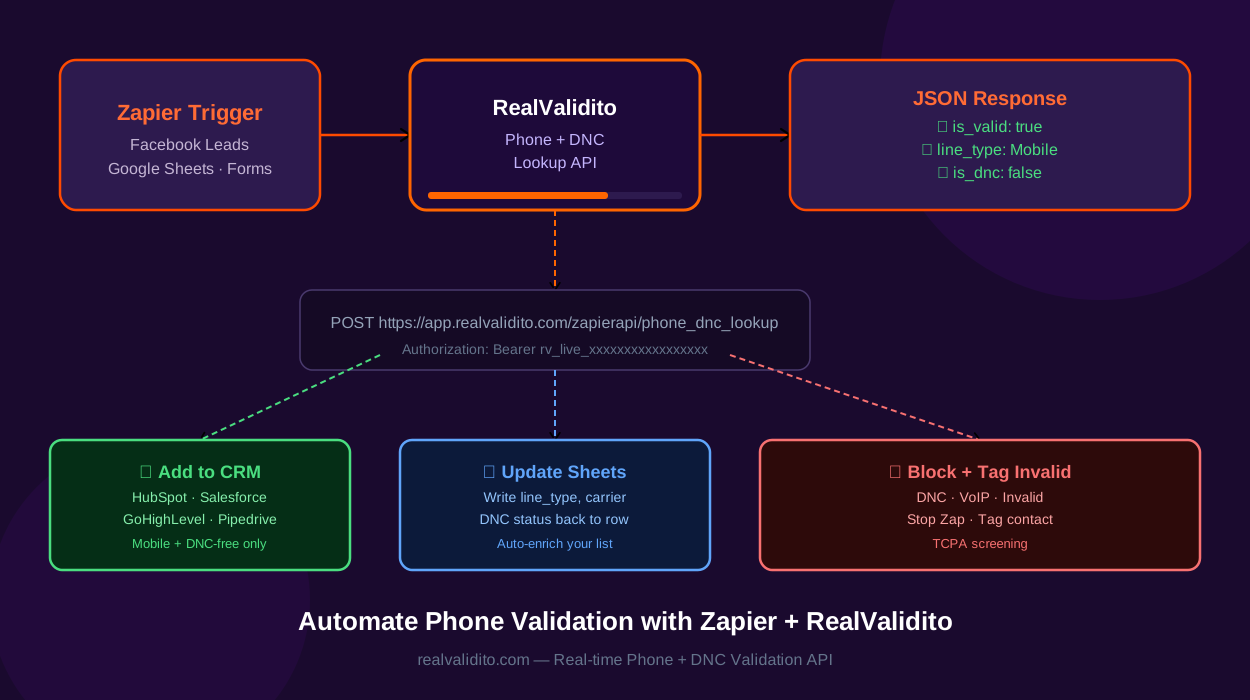
If you use Zapier to automate your business workflows, you can now add real-time phone validation to any Zap — without writing a single line of code. By connecting Zapier with RealValidito, you can automatically validate phone numbers, check DNC status, and filter out bad contacts before they reach your CRM, email platform, or SMS tool.
This guide shows you exactly how to set it up — step by step.
Why Phone Validation Matters in Zapier Workflows
Zapier connects thousands of apps. Every day, millions of leads flow through Zapier from Facebook Lead Ads, Google Sheets, Typeform, Webflow, and dozens of other sources. The problem? None of these sources validate the phone numbers they collect.
Without phone validation in your Zapier workflows, you risk:
- Adding fake or disconnected numbers to your CRM
- Sending SMS to landlines that can never receive texts
- Calling contacts on the Do Not Call (DNC) Registry — a potential TCPA violation
- Wasting money on invalid leads that will never convert
- Damaging your SMS sender reputation due to high bounce rates
RealValidito solves this by adding a real-time phone validation step to any Zap — checking every number before it reaches the next step in your workflow.
What RealValidito Validates
Every RealValidito API call returns the following typically within 500 ms:
- Is Valid — whether the number is a real, active US or Canada phone number
- Line Type — Mobile, Landline, VoIP, Toll-Free, or Unknown
- Carrier — T-Mobile, Verizon, AT&T, and more
- DNC Status — whether the number appears in our DNC screening data
- TCPA Litigator Flag — whether the number is linked to known TCPA lawsuit filers
- Location — city, state, ZIP code, and country
Use this data in your Zap to filter, tag, route, or block contacts automatically.
3 Real-World Zapier + RealValidito Workflows
Workflow 1 — Facebook Lead Ads → Validate → CRM
When a new lead comes in from a Facebook Lead Ad, validate their phone number before adding them to your CRM:
- Trigger: New lead from Facebook Lead Ads
- Action: Webhooks by Zapier → POST to RealValidito
- Filter: Only continue if
is_valid = trueANDis_dnc = false - Action: Add to HubSpot / Salesforce / GoHighLevel
Result: Only clean, valid, DNC-free numbers enter your CRM.
Workflow 2 — Google Sheets → Validate → Mark Results
Automatically validate a list of phone numbers in Google Sheets and write the results back:
- Trigger: New row added in Google Sheets
- Action: Webhooks by Zapier → POST to RealValidito
- Action: Update Google Sheets row with
line_type,is_dnc,carrier
Result: Your spreadsheet is automatically enriched with validation data for every new number.
Workflow 3 — Typeform / Webflow Form → Validate → SMS Tool
When someone fills out a form on your website, validate their phone before adding them to an SMS campaign:
- Trigger: New submission in Typeform or Webflow
- Action: Webhooks by Zapier → POST to RealValidito
- Filter: Only continue if
line_type = MobileANDis_dnc = false - Action: Add to SMS campaign in Klaviyo, ActiveCampaign, or Twilio
Result: Only mobile, DNC-free numbers enter your SMS campaigns — protecting your sender reputation and supporting your TCPA compliance.
How to Set Up RealValidito in Zapier
Step 1 — Get Your RealValidito Integration Key
- Create a free RealValidito account — you get 1,000 free Phone credits and 100 free DNC credits, no credit card required.
- Log in and go to My Account → API Credentials.
- Scroll to the GoHighLevel & Zapier card (Integration Key).
- Click Generate Key and copy your
rv_live_...key immediately.
Step 2 — Set Up the Webhook in Zapier
- Log in to RealValidito on Zapier and click Use this Zap to start from a pre-built template, or go to zapier.com and click Create Zap to build your own.
- Set your Trigger — for example: new row in Google Sheets, new Facebook lead, or new form submission.
- Add an Action step and search for Webhooks by Zapier.
- Select Custom Request as the action event.
- Set the Method to POST.
- Set the URL to:
https://app.realvalidito.com/zapierapi/phone_dnc_lookup - Under Headers, add:
Authorization: Bearer rv_live_your_key_here Content-Type: application/json - Under Data, set:
{"phone": "your_phone_field_here"}(Map the phone field from your trigger step.)
- Click Test & Continue — Zapier will show the full response including
is_valid,line_type,is_dnc,is_tcpa,is_state_dnc, andstate_dnc_reason.
Step 3 — Add a Filter Step
After the webhook action, add a Filter by Zapier step:
- Continue only if
is_valid=true - AND
is_dnc=false - AND
line_type=Mobile(if running an SMS campaign)
This ensures only clean, valid numbers reach the next step in your Zap.
API Response Example
Here is what RealValidito returns for each phone number:
{
  "status": "success",
  "phone": "8005551234",
  "is_valid": true,
  "line_type": "Mobile",
  "carrier": "T-Mobile",
  "state": "CA",
  "city": "Los Angeles",
  "country": "US",
  "zip": "90001",
  "timezone": "PST (America/Los_Angeles)",
  "network_domain": "8005551234@tmomail.net",
  "is_tcpa": false,
  "is_dnc": false,
  "is_state_dnc": false,
  "state_dnc_reason": ""
}
All these fields are available as variables in your next Zapier step — map them to any field in your CRM, spreadsheet, or database.
Available Endpoints for Zapier
RealValidito provides three dedicated endpoints for Zapier integration:
- Phone Lookup only —
POST /zapierapi/phone_lookup— validates line type, carrier, location (1 phone credit) - DNC Lookup only —
POST /zapierapi/dnc_lookup— checks DNC and TCPA status (1 DNC credit) - Combined Phone + DNC —
POST /zapierapi/phone_dnc_lookup— all data in one call (recommended)
Full documentation is available at the RealValidito API docs — Zapier Integration.
Pricing
- New accounts get 1,000 free Phone credits and 100 free DNC credits — no credit card required
- Credits never expire
- View full pricing and credit packages
Start Automating Phone Validation with Zapier Today
Stop letting bad phone numbers enter your workflows. With RealValidito and Zapier, you can validate every number automatically — across any app, any platform, any workflow — without writing a single line of code.
Get 1,000 Free Credits — No Credit Card Required
Questions? Contact us at realvalidito.com/contact-us or check the full Zapier API documentation. For step-by-step setup help, visit our Zapier Help & Setup Guide.